Knowledge Banks
How to add web pages to a Knowledge Bank
Discovery reads your website and turns the useful pages into Knowledge entries. It gives every page a relevance score against the bank's Purpose, so you are not forced to keep everything it finds.
Updated October 4, 2026. Applies to the BotableX Staff Portal. For tenant admins.
Discovery reads your website and turns the useful pages into Knowledge entries. It gives every page a relevance score against the bank’s Purpose, so you are not forced to keep everything it finds.
This article shows how to run a discovery, how to choose what to keep, and how to keep it up to date later.
Before you start
- You need the Knowledge permission (
knowledge.manage). - Write a good Purpose on the bank first, and press ✨ Refine. Discovery scores pages against it, so a vague Purpose gives you a vague result.
- Have the starting web address ready, for example your help center home page. It must be a page anyone can open without signing in.
So how do you run a discovery?
- In the menu on the left, click Knowledge Banks, open your bank, and make sure the Discovery tab is selected. It is the first tab.
- In URL, type the address to start from, for example
https://www.example.com/help. - In Depth, choose how far to follow links.
0 - root onlyreads just that page.1 - root + linksreads it and the pages it links to.2and3 (max)go further. - Leave Cutoff at
70for now. You can change it after the results come in. - Leave Only crawl pages on the same domain ticked unless you really want other websites read.
- Tick Include subdomains only if your help pages live on something like
support.example.com. - Click Run discovery.
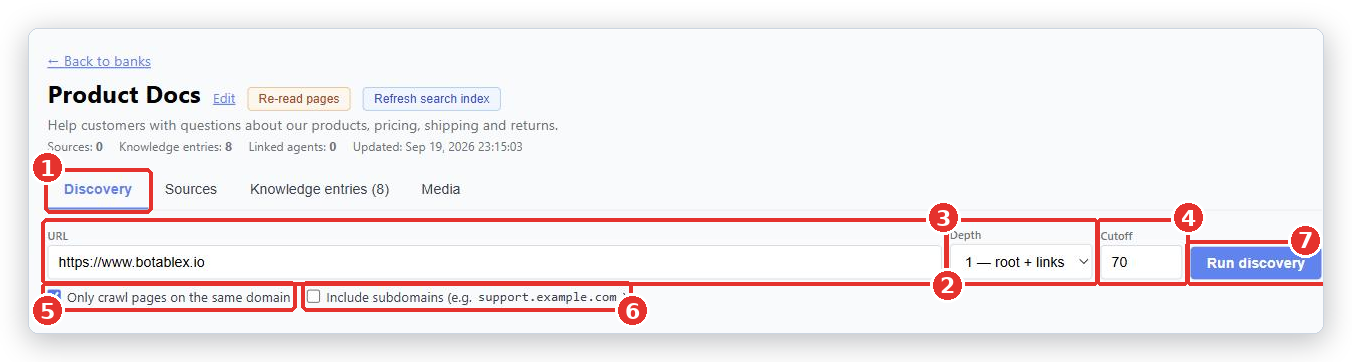
Wait. A green progress strip appears at the top of the bank. Depth 3 on a large site can take up to three minutes.
Choosing what to keep
When discovery finishes you see Discovery complete. N link(s) graded. and a table of the pages it found. Each row has a Relevance score, the URL, a short Description and the Crawl depth it was found at.
- Drag the Cutoff slider. Every page scoring at or above that number is ticked for you.
- Look through the rows and tick or untick by hand. Job adverts, press releases and legal boilerplate are common ones to drop.
- Use Show: to filter the table: All, Selected only, Not selected, Fresh this run, From prior runs.
- Click Save + Index selected.
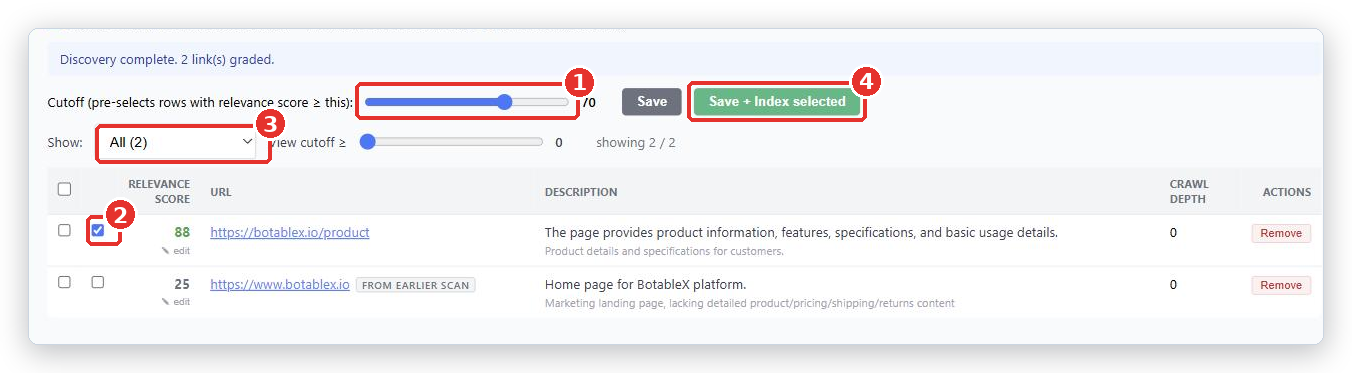
The difference between the two buttons matters. Save just remembers your choices. Save + Index selected actually reads those pages and turns them into Knowledge entries.
After you click, a message says how many links were queued. The bank’s entry count rises as pages are read and processed. You can leave the page and come back.
Keeping it up to date
When your website changes, you do not have to run discovery again from scratch.
- Press Re-read pages at the top of the bank. This reads every web page source again and replaces its entries. Uploaded files are skipped, because they cannot be re-read.
- Or tick individual rows on the Sources tab and press Re-index selected.
- Run a new discovery only when there are new pages that were not there before. Pages from earlier runs are marked FROM EARLIER SCAN so you can tell them apart.
There is also Refresh search index at the top of the bank. Use that one only after BotableX changes its AI settings, not for content changes.
What happens next
Open the Knowledge entries tab and read a few. That is what the bot sees. If entries are full of menu text, cookie banners or footers, your Purpose needs tightening and some pages need unticking.
Common problems
| Problem | What to do |
|---|---|
| Discovery found almost nothing | Raise Depth, or start from a page that links to everything, such as your help center index. Check Only crawl pages on the same domain is not blocking the pages you want. Some websites build their menus with scripts, and those links cannot be followed; start from the pages themselves instead. |
| Discovery found hundreds of useless pages | Tighten the bank Purpose, press ✨ Refine, add Grade criteria such as Ignore news and careers pages, then raise the Cutoff. |
| Entries are full of menus and cookie text | Untick those pages and use pages with real content. A page that is mostly navigation makes poor entries. |
| Nothing happens after Save + Index selected | Give it time and reload the page. The bank entry count rises as pages finish. Check the Sources tab for rows stuck at failed. If a queued page never appears on the Sources tab, contact BotableX support. |
| Pages behind a login were not read | Discovery can only read pages anyone can open. Export that content and upload it as a file instead. |
Tip from the BotableX team. Run your first discovery at Depth
1from your help center index page, not from your home page. A home page is mostly marketing and scores low; the index page links to exactly the pages you want.