Getting started
How BotableX fits together
BotableX answers your customers for you, on your website, by email and on WhatsApp. To make that happen you need four things: a Channel, an Agent, a Bot Attachment and at least one Knowledge Bank.
Updated October 4, 2026. Applies to the BotableX Staff Portal. For tenant admins.
BotableX answers your customers for you, on your website, by email and on WhatsApp. To make that happen you need four things: a Channel, an Agent, a Bot Attachment and at least one Knowledge Bank.
This article explains what each one is, in plain words, and the order to build them in. Read it first. Every other article uses these four words.
The four words you need
People mix these up all the time, so here they are side by side.
| Word | What it means |
|---|---|
| Channel | The way messages arrive and leave. A website chat window, an email mailbox, a WhatsApp number, an SMS number. A Channel carries messages. It does not answer them. |
| Agent | The bot’s settings: what it is told to do, which AI model it uses, and which Knowledge Banks it may read. An Agent is not a person. It is a saved set of instructions. |
| Bot Attachment | The link that puts one Agent on one Channel. Without it, nothing answers. This is the piece people forget. |
| Knowledge Bank | A folder of your own content that the bot reads to answer questions. Your help pages, your price list, your policies. |
A simple way to remember it: the Channel is the phone line, the Agent is the person’s training, and the Bot Attachment is putting that trained person on that phone line. The Knowledge Bank is the folder of notes they answer from.
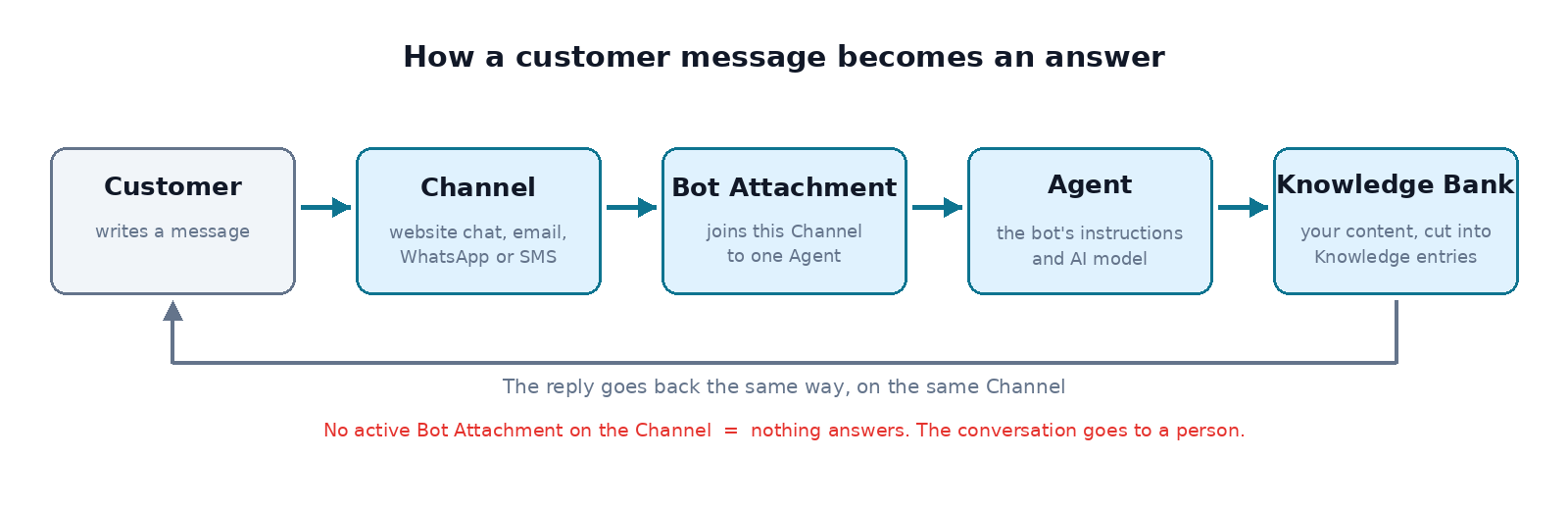
What happens when a customer writes to you
- The message arrives on a Channel.
- BotableX looks for the active Bot Attachment on that Channel. If there is none, nothing answers and the conversation is passed to a person instead.
- The Agent named in the Bot Attachment reads the message.
- The Agent searches its Knowledge Banks for anything that matches the question.
- The Agent writes a reply and sends it back out on the same Channel.
- If the Agent is not sure enough, it asks a person for help instead of guessing.
BotableX can also look the customer up in your CRM and write the conversation back to it when it closes. That is set up separately and has its own articles.
Where everything lives in the Staff Portal
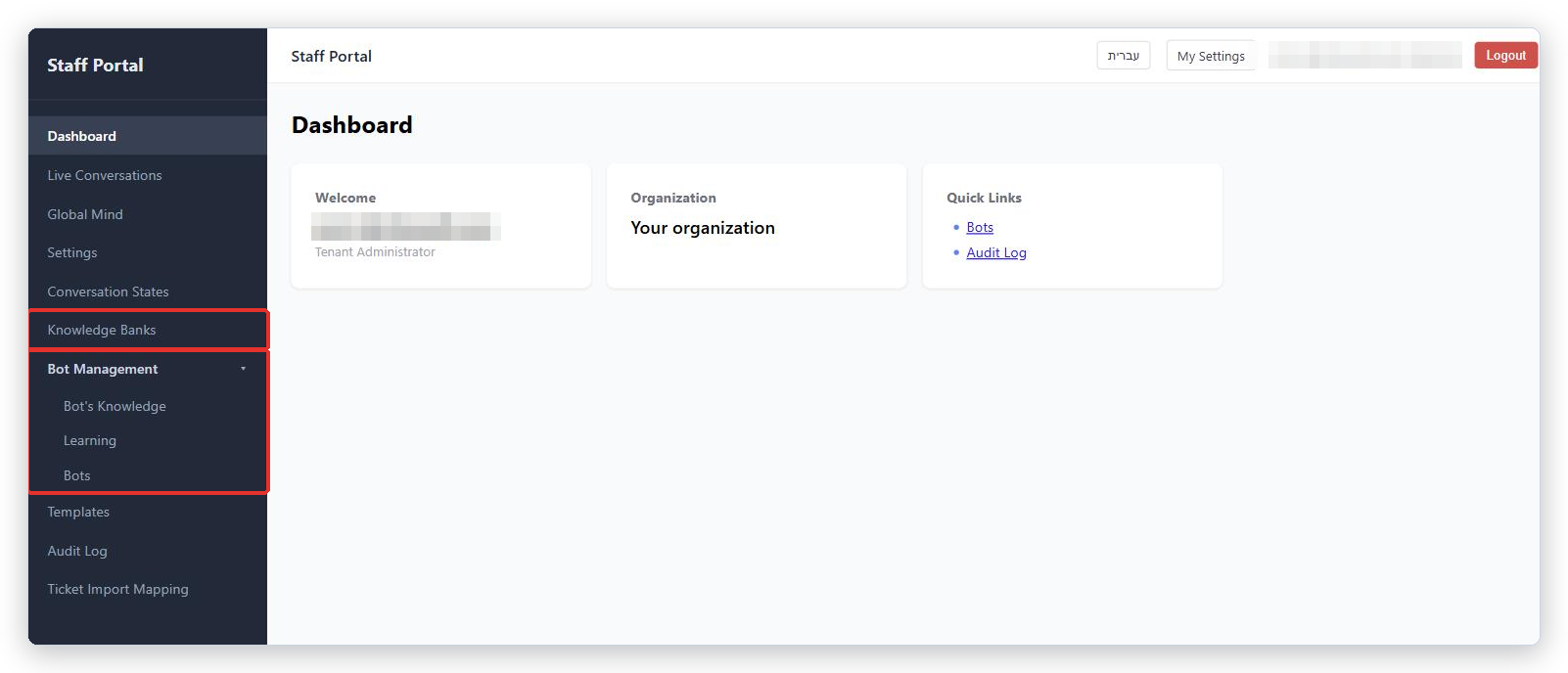
The Staff Portal is the website where you set everything up (app.botablex.io). Look at the menu on the left.
- Knowledge Banks is a top-level entry of its own. This is where your content lives.
- Bot Management is a group you can open and close. Inside it are Bot’s Knowledge, Learning and Bots.
- Bots is one page with three tabs: Channels, Agents and Bot Attachments. Three of the four words above are set up on this one page.
- Settings holds the CRM tab and the Property Mapping tab.
- Live Conversations shows what is happening right now.
The order to build things in
Build in this order. Each step needs the one before it.
- Create a Knowledge Bank and put some of your content in it. A bot with nothing to read cannot answer anything.
- Create an Agent, write its instructions, and tick the Knowledge Bank you just made under Connected Knowledge Banks.
- Create a Channel so messages have a way in.
- Create a Bot Attachment joining that Agent to that Channel, and make it active.
- Test it. Send yourself a message on the Channel and see what comes back.
- Later: connect your CRM, keep the review of email replies switched on, and use Learning to improve the answers.
Important. Once a Bot Attachment is active on a live Channel, real customers get real replies. Test on a Channel only you can reach before you point your public website or your real WhatsApp number at it.
Words you will also meet
| Word | What it means |
|---|---|
| Knowledge entry | One small piece of an answer inside a Knowledge Bank. Your documents are cut into these so the bot can find the right part. |
| Source | One thing you added to a Knowledge Bank: a file you uploaded or a web page that was read. |
| Bot’s Knowledge | What the bot has learned about how to behave, in four levels. Not the same as Knowledge Banks, which hold facts. |
| Agent Console | The separate screen your support staff use to watch conversations, take over, and approve email replies (console.botablex.io). |
| Widget ID | The code that identifies your website chat window. |
What happens next
Start with the article on Knowledge Banks, then Agents, then Channels, then Bot Attachments. If you only want the website chat window working today, those four articles are all you need.
Tip from the BotableX team. When something “does not work”, check the Bot Attachment first. Nine times out of ten the Channel and the Agent are both fine and simply not joined together.