Learning and behavior
How to review email replies before they are sent
BotableX can hold every email reply the Bot writes until a person has looked at it. This is switched on by default.
Updated October 4, 2026. Applies to the BotableX Staff Portal. For tenant admins.
BotableX can hold every email reply the Bot writes until a person has looked at it. This is switched on by default.
This article explains how review works, what your team does with a waiting reply, and the difference between “reviewed” and “held forever”.
Before you start
- Your team reviews replies in the Agent Console (console.botablex.io), not in the Staff Portal.
- Email reply review is on by default for new accounts. That is deliberate.
- Changing the review timers is done by BotableX, not from the portal. Ask your BotableX administrator.
The two things people confuse
Important. Review being on does not mean nothing leaves unattended. By default, a reply that nobody opens is sent automatically once the waiting time runs out. That is the safety net for customers who would otherwise never get an answer.
If you want a guarantee that no email ever leaves without a person sending it, that is a different setting, and you control it yourself on the Channel. Set the Email Channel to Consultation only - a person always sends under Who sends the reply. Then no timer releases anything.
The trade is real, and you have to choose. With automatic sending on, a customer always gets an answer but it may not have been read by anyone. With it off, every answer is read by a person, but a queue nobody watches means a customer nobody answered.
So how do you make a person send every email?
- In the menu on the left, open Bot Management, click Bots, and on the Channels tab click View on your Email Channel.
- Find the Who sends the reply card.
- Choose Consultation only - a person always sends.
- Click Save bot mode.
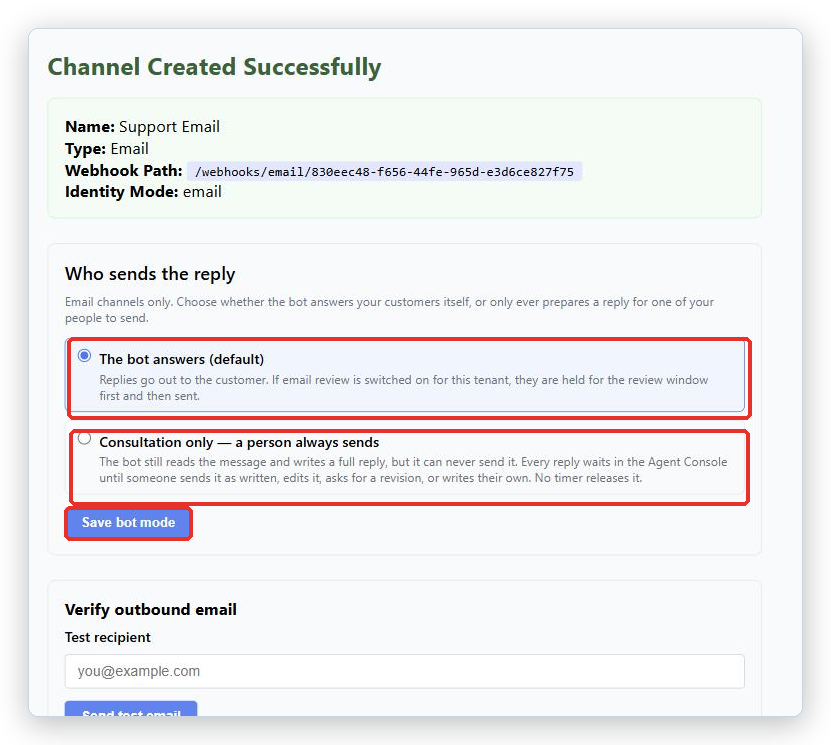
In the Channels list the Channel now shows the badge Drafts only. To go back, choose The bot answers (default) and save again.
What your team sees
In the Agent Console a waiting reply appears as a card titled Email reply - awaiting your review, with the note The bot drafted this reply. Approve it, ask for a revision, or write it yourself.
| Button | What it does |
|---|---|
| Approve & send | Sends the Bot’s reply exactly as written. No AI runs again. |
| Ask for a revision | You say what to change, and the Bot writes it again. The card shows Revision 2, and so on. |
| Edit myself | You rewrite the reply and send your own version. |
Only Edit myself teaches the Bot anything. Approving as written and asking for a revision teach it nothing. So if the Bot keeps making the same mistake, rewriting the reply yourself is the fix that sticks.
Finding waiting replies
- Conversations in the inbox carry a badge: Reply waiting with a countdown, or Needs you.
- There is a queue headed Awaiting your review, with the reminder The customer has not been answered until one of these is sent.
- A reply that will not send on its own shows Waiting for a person - this reply will not send on its own.
- A reply that will send on its own shows Sends automatically in ….
Only one person can work on a reply at a time. If someone else opens it first you will see Another agent is reviewing this draft.
The waiting times
These are the defaults BotableX ships with. Your account may differ; ask if you need to know for certain.
- A reply is held for at least 90 minutes before it can be sent automatically. Nothing can make that shorter.
- It waits at most 90 minutes in total.
- If someone opens the conversation, the idle timer resets.
- After a restart of the system there is a 90 minute grace period, so nothing overdue is dumped out all at once.
If something goes wrong inside the review system, the reply is not sent. It is held and recorded instead. Failing safely is the point.
Common problems
| Problem | What to do |
|---|---|
| Customers got replies nobody reviewed | Automatic sending is on and the waiting time ran out. To stop it completely, set the Channel to Consultation only - a person always sends. |
| Replies pile up and customers wait | The opposite problem. Someone has to watch the queue. Consider going back to The bot answers (default) as a safety net. |
| Another agent already owns this draft - your action was not applied. | Someone else acted on it first. Refresh and check the conversation. |
| The revision failed. The previous version is shown. | The Bot could not rewrite it. Approve the previous version, or use Edit myself. |
| A reply was sent seconds after an error | That is an old defect and is fixed. If you see it now, contact BotableX support immediately with the conversation id. |
| I want the review timers changed for one Channel only | Ask your BotableX administrator. The timers are not a portal setting. Who sends the reply is, and it is per Channel. |
Tip from the BotableX team. Give one named person the job of clearing Awaiting your review twice a day, morning and afternoon. A queue with an owner empties. A queue for “the team” fills up.